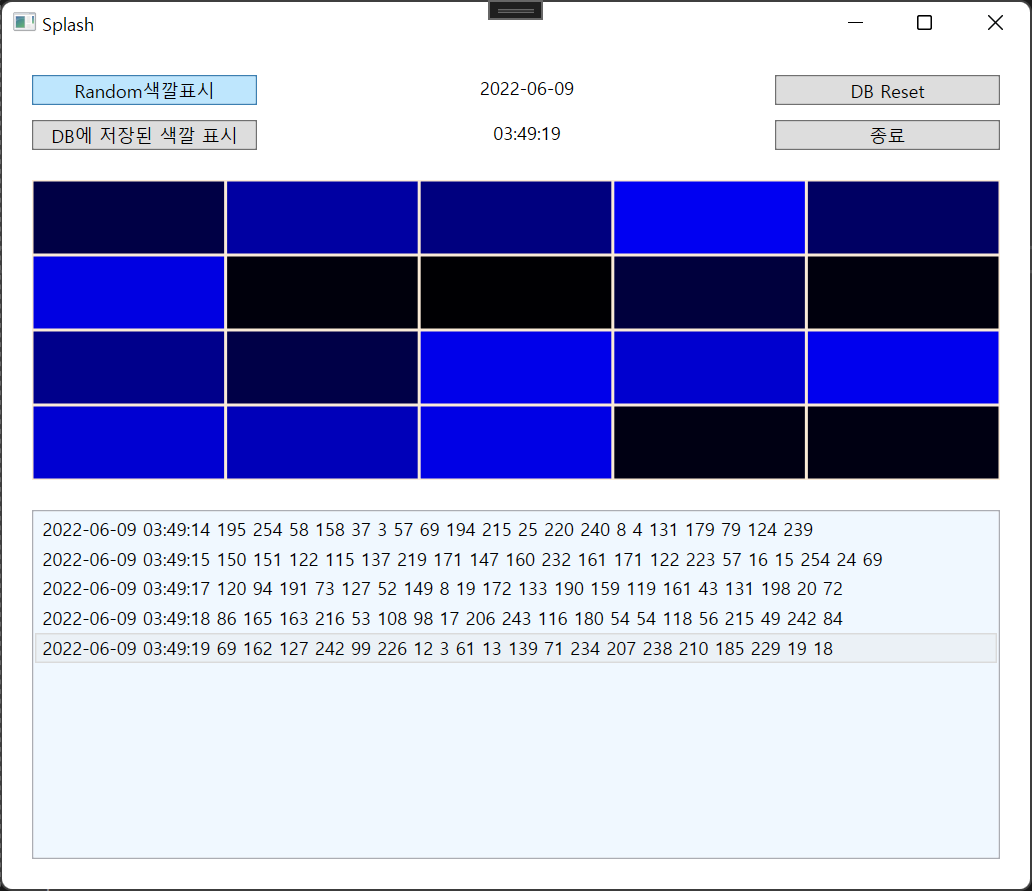
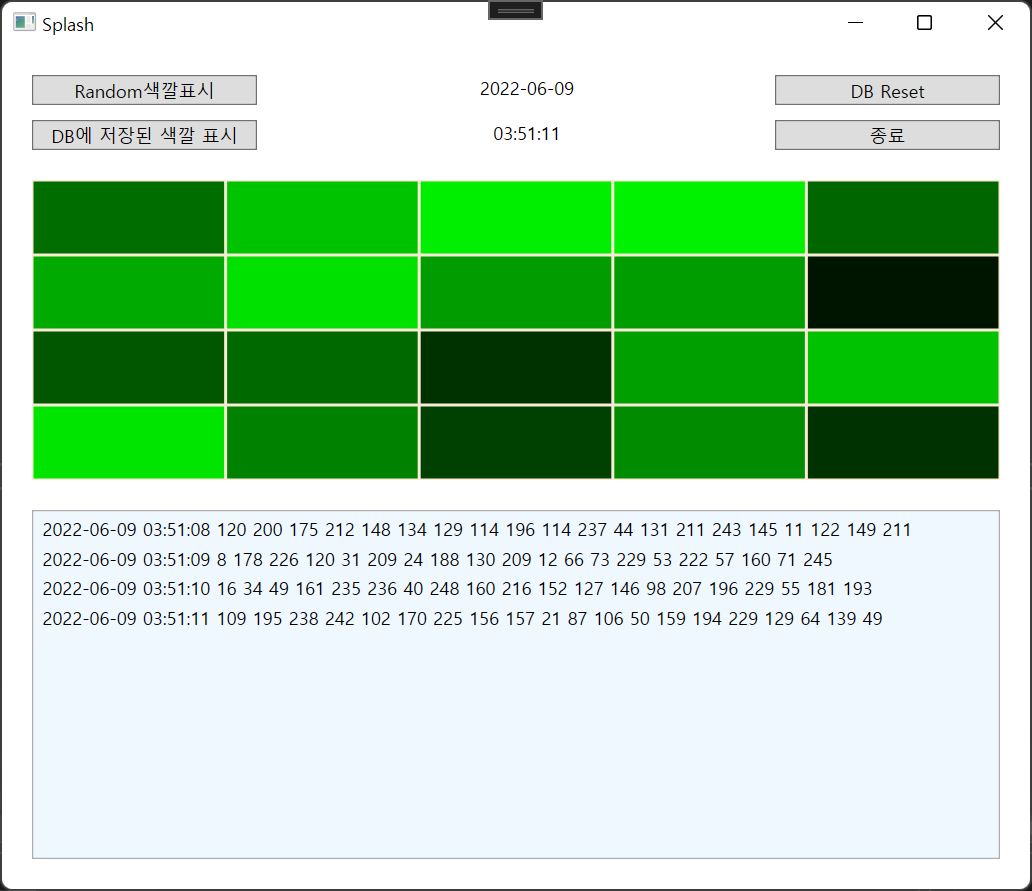

Random으로 색깔을 만들어 표시하고 DB에 저장하여 값을 불러오도록 해보자
	List<Border> borderList;
        // Timer t = new Timer();  winform 에서 사용하는 방법
        // wpf는 timer객체 없음
        DispatcherTimer t = new DispatcherTimer();
        Random r = new Random();
전체 소스코드는 맨 아래에 게시해두었다.
winform이었다면 timer로 객체를 만들었겠지만 wpf는 timer객체가 없기때문에 DispathcherTimer라는 메소드를 이용해 객체를 생성해주자.
public MainWindow()
        {

            InitializeComponent();
            borderList = new List<Border>
            {
                bd1,bd2,bd3,bd4,bd5,bd6,bd7,bd8,bd9,bd10,bd11,bd12,bd13,bd14,bd15,bd16,bd17,bd18,bd19,bd20
            };
            t.Interval = new TimeSpan(0, 0, 1); // 시 , 분, 초;
            t.Tick += T_Tick;
        }
MainWindow에는 borderList로 20개의 bd를 생성 후, time interval은 1초로 저장
private void T_Tick(object sender, EventArgs e)
        {
            string date = DateTime.Now.ToString("yyyy-MM-dd");
            string time = DateTime.Now.ToString("hh:mm:ss");
            lblDate.Text = date;
            lblTime.Text = time;


            byte[] colors = new byte[20];
            for(int i = 0; i < colors.Length; i++)
            {
                colors[i] = (byte)(r.Next(255));
                borderList[i].Background = new SolidColorBrush(Color.FromRgb(0, 0, colors[i]));
            }

            string s = "";
            s += date + " " + time + " ";
            for(int i=0; i<borderList.Count; i++)
            {
                s += colors[i] + " ";
            }
            lstDB.Items.Add(s);


            lstDB.SelectedIndex = index++; //select된 인덱스 표시
            lstDB.ScrollIntoView(lstDB.SelectedItem); // 스크롤이 선택된 아이템 포커싱

            //DB에 저장
            string sql = string.Format("INSERT INTO ColorTable Values('{0}','{1}'", date, time);
            for (int i = 0; i < 20; i++)
            {
                sql += "," + colors[i];
            }
            sql += ")";
            //MessageBox.Show(sql);

            using (SqlConnection conn = new SqlConnection(connStr))
            using (SqlCommand comm = new SqlCommand(sql, conn))
            {
                conn.Open();
                comm.ExecuteNonQuery();
            }
        }
Tick함수가 수행될때마다 실행되는 코드들이다.
1. 1초마다 랜덤값들을 byte[]의 color객체에 저장 + FromRgb이용한 색깔 표현
2. border에 저장된 값들을 모두 string s에 저장 후 출력
3. 값이 출력될때마다 스크롤이 움직이지않음 => ScrollIntoView를 이용하여 스크롤 움직이기
4. sql문을 이용해 값을 DB에 저장
        int id = 0; //스크롤을 위해 필요
        //DB에서 읽어오기
        private void btnDB_Click(object sender, RoutedEventArgs e)
        {
            lstDB.Items.Clear();

            string sql = "SELECT * FROM ColorTable";
            int[] colors = new int[20];

            using (SqlConnection conn = new SqlConnection(connStr))
            using (SqlCommand comm = new SqlCommand(sql, conn))
            {
                conn.Open();
                SqlDataReader reader = comm.ExecuteReader();

                string s = "";
                while (reader.Read())
                {
                    s = "";
                    lblDate.Text = reader["Date"].ToString();
                    s += lblDate.Text + " ";
                    lblTime.Text = reader["Time"].ToString();
                    s += lblTime.Text + " ";
                    for(int i=0; i<20; i++)
                    {
                        colors[i] = int.Parse(reader[i + 3].ToString());
                        s += colors[i] + " ";
                    }
                }
                lstDB.Items.Add(s);
                lstDB.SelectedIndex = id++;
                lstDB.ScrollIntoView(lstDB.SelectedItem);

                for(int i=0; i < colors.Length; i++)
                {
                    borderList[i].Background = new SolidColorBrush(Color.FromRgb(0, (byte)colors[i], 0));
                }

                //WPF delay
                Dispatcher.Invoke((ThreadStart)(() => { }), DispatcherPriority.ApplicationIdle);
                Thread.Sleep(20); // 20ms
            }


        }
DB에서 RGB값을 불러오는 코드.
가장 중요한 것은 WPF에서 delay를 사용한것이다.
Dispatcher.Invoke사용 Thread.Sleep(20) //20ms동안 대기시간 주기
bool flag = false;
        private void btnRandom_Click(object sender, RoutedEventArgs e)
        {
            if (flag == false)
            {
                t.Start();
                btnRandom.Content = "중지";
                flag = true;

            }
            else
            {

                t.Stop();
                btnRandom.Content = "Random색깔표시";
                flag = false;
            }


        }
간단하게 flag이용하여 [random색깔 수행 or 중지] 구현
//DB의 값을 지운다
        private void btnReset_Click(object sender, RoutedEventArgs e)
        {
            lstDB.Items.Clear();
            string sql = "DELETE FROM ColorTable";
            using (SqlConnection conn = new SqlConnection(connStr))
            using (SqlCommand comm = new SqlCommand(sql, conn))
            {
                conn.Open();
                comm.ExecuteNonQuery();
            }
        }

        private void btnExit_Click(object sender, RoutedEventArgs e)
        {
            this.Close();
        }
DB값 지우기 및 종료버튼
using System;
using System.Collections.Generic;
using System.Windows;
using System.Windows.Controls;
using System.Windows.Media;
using System.Windows.Threading;
using System.Data.SqlClient;
using System.Threading;


namespace _041_Splash
{
    /// <summary>
    /// MainWindow.xaml에 대한 상호 작용 논리
    /// </summary>
    public partial class MainWindow : Window
    {
        List<Border> borderList;
        // Timer t = new Timer();  winform 에서 사용하는 방법
        // wpf는 timer객체 없음
        DispatcherTimer t = new DispatcherTimer();
        Random r = new Random();

        string connStr = @"Data Source = (LocalDB)\MSSQLLocalDB; AttachDbFilename = C:\Csharp\041_Splash\Colors.mdf; Integrated Security = True";

        public MainWindow()
        {

            InitializeComponent();
            borderList = new List<Border>
            {
                bd1,bd2,bd3,bd4,bd5,bd6,bd7,bd8,bd9,bd10,bd11,bd12,bd13,bd14,bd15,bd16,bd17,bd18,bd19,bd20
            };
            t.Interval = new TimeSpan(0, 0, 1); // 시 , 분, 초;
            t.Tick += T_Tick;
        }
        int index;
        private void T_Tick(object sender, EventArgs e)
        {
            string date = DateTime.Now.ToString("yyyy-MM-dd");
            string time = DateTime.Now.ToString("hh:mm:ss");
            lblDate.Text = date;
            lblTime.Text = time;


            byte[] colors = new byte[20];
            for(int i = 0; i < colors.Length; i++)
            {
                colors[i] = (byte)(r.Next(255));
                borderList[i].Background = new SolidColorBrush(Color.FromRgb(0, 0, colors[i]));
            }

            string s = "";
            s += date + " " + time + " ";
            for(int i=0; i<borderList.Count; i++)
            {
                s += colors[i] + " ";
            }
            lstDB.Items.Add(s);


            lstDB.SelectedIndex = index++; //select된 인덱스 표시
            lstDB.ScrollIntoView(lstDB.SelectedItem); // 스크롤이 선택된 아이템 포커싱

            //DB에 저장
            string sql = string.Format("INSERT INTO ColorTable Values('{0}','{1}'", date, time);
            for (int i = 0; i < 20; i++)
            {
                sql += "," + colors[i];
            }
            sql += ")";
            //MessageBox.Show(sql);

            using (SqlConnection conn = new SqlConnection(connStr))
            using (SqlCommand comm = new SqlCommand(sql, conn))
            {
                conn.Open();
                comm.ExecuteNonQuery();
            }
        }

        private void Button_Click(object sender, RoutedEventArgs e)
        {

        }

        private void Button_Click_1(object sender, RoutedEventArgs e)
        {

        }

        int id = 0; //스크롤을 위해 필요
        //DB에서 읽어오기
        private void btnDB_Click(object sender, RoutedEventArgs e)
        {
            lstDB.Items.Clear();

            string sql = "SELECT * FROM ColorTable";
            int[] colors = new int[20];

            using (SqlConnection conn = new SqlConnection(connStr))
            using (SqlCommand comm = new SqlCommand(sql, conn))
            {
                conn.Open();
                SqlDataReader reader = comm.ExecuteReader();

                string s = "";
                while (reader.Read())
                {
                    s = "";
                    lblDate.Text = reader["Date"].ToString();
                    s += lblDate.Text + " ";
                    lblTime.Text = reader["Time"].ToString();
                    s += lblTime.Text + " ";
                    for(int i=0; i<20; i++)
                    {
                        colors[i] = int.Parse(reader[i + 3].ToString());
                        s += colors[i] + " ";
                    }
                }
                lstDB.Items.Add(s);
                lstDB.SelectedIndex = id++;
                lstDB.ScrollIntoView(lstDB.SelectedItem);

                for(int i=0; i < colors.Length; i++)
                {
                    borderList[i].Background = new SolidColorBrush(Color.FromRgb(0, (byte)colors[i], 0));
                }

                //WPF delay
                Dispatcher.Invoke((ThreadStart)(() => { }), DispatcherPriority.ApplicationIdle);
                Thread.Sleep(20); // 20ms
            }


        }
        bool flag = false;
        private void btnRandom_Click(object sender, RoutedEventArgs e)
        {
            if (flag == false)
            {
                t.Start();
                btnRandom.Content = "중지";
                flag = true;

            }
            else
            {

                t.Stop();
                btnRandom.Content = "Random색깔표시";
                flag = false;
            }


        }
        //DB의 값을 지운다
        private void btnReset_Click(object sender, RoutedEventArgs e)
        {
            lstDB.Items.Clear();
            string sql = "DELETE FROM ColorTable";
            using (SqlConnection conn = new SqlConnection(connStr))
            using (SqlCommand comm = new SqlCommand(sql, conn))
            {
                conn.Open();
                comm.ExecuteNonQuery();
            }
        }

        private void btnExit_Click(object sender, RoutedEventArgs e)
        {
            this.Close();
        }
    }
}'C#' 카테고리의 다른 글
| 043_TwoChart (0) | 2022.06.09 |
|---|---|
| 042_Chart (0) | 2022.06.09 |
| 040_WPF Login (0) | 2022.05.20 |
| 039_PhoneBook(Access DB예제) (0) | 2022.05.20 |
| 038_ListArray (0) | 2022.05.11 |