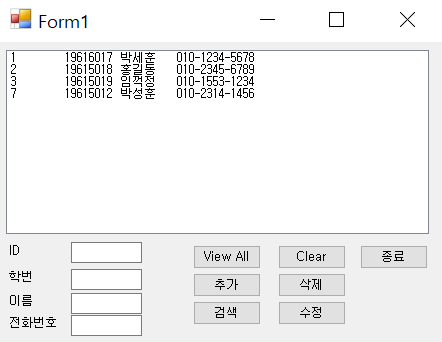
Access DB를 이용해서 전화번호부를 만들어보자.
기능으로는 전체보기, 추가, 검색, 삭제, 수정 등
먼저 DB연동이 필요하다.
MS사의 Access DB의 파일을 만들고 필드명을 지정해야한다.
필드명으로는 먼저 ID, SID(학번), SName,Phone 정도면 되겠다.
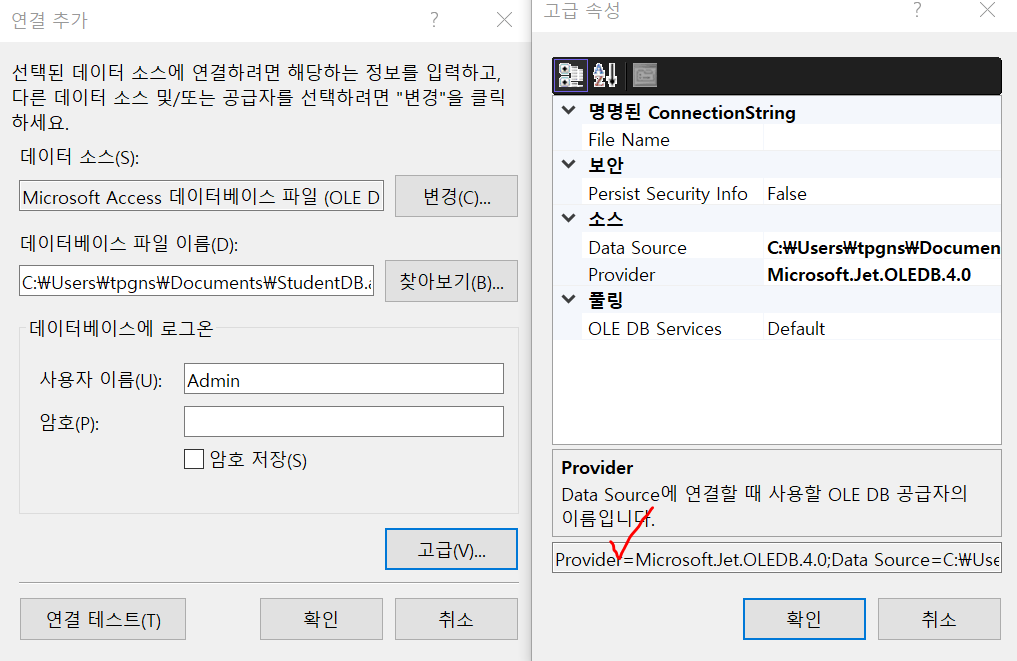
visual stdio에서 도구 - 데이터베이스에 연결 하면 위의 창과 같이 뜨는데 찾아보기로 DB파일 연결해주고, 고급을 누르면 Provider에 체크표시와 같이 뜨게 된다. 이는 나중에 DB에 접근할때 사용해야하니 복사해두도록하자.
확인을 눌러서 연결이 완료되면

이렇게 전력이 연결된 플러그처럼 초록색으로 뜨게된다.
using System;
using System.Collections.Generic;
using System.ComponentModel;
using System.Data;
using System.Data.OleDb;
using System.Drawing;
using System.Linq;
using System.Text;
using System.Threading.Tasks;
using System.Windows.Forms;
C#에서 DB를 사용하려면 using문으로 Data.OleDb를 추가해줘야한다.
DB는 계속 열어두고 작업하는 것이 아니라
1) DB연결 - 2) DB에서 수행할 SQL 명령어를 이용한 작업 - 3) DB 연결닫기
순으로 진행되기때문에 아래 소스코드처럼 각각의 기능에서 DB를 열고닫고 하는것을 확인 할 수 있다.
	string connStr = @"Provider = Microsoft.ACE.OLEDB.12.0; Data Source = C:\Users\tpgns\Documents\StudentDB.accdb";
        OleDbConnection conn = null;
        OleDbCommand comm = null;
        OleDbDataReader reader = null;
        public Form1()
        {
            InitializeComponent();
            DisplayStudents();
        }

        private void DisplayStudents()
        {
            if(conn == null)
            {
                conn = new OleDbConnection(connStr);
                conn.Open();

            }
            string sql = "SELECT * FROM StudentTable";
            comm = new OleDbCommand(sql, conn);
            reader = comm.ExecuteReader();

            while (reader.Read())
            {
                string item = "";
                item += reader["ID"].ToString() + "\t";
                item += reader["SID"].ToString() + "\t";
                item += reader["SName"].ToString() + "\t";
                item += reader["Phone"].ToString();

                lstStudent.Items.Add(item);
            }
            reader.Close();
            conn.Close();
            conn = null;
        }
위에서 부터 설명하자면
string connStr은 DB에 연결하기 위한 문자열이다. 아까 복사해준것이므로 위 코드처럼 붙여넣기하면 된다.
그리고 using문에서 처리 했기때문에 OleDbConnection,Command,DataReader등을 사용할수있는데, 이것들은 모두 연결, 작업, 데이터 읽기(실행)를 처리하는 것들이다. 아직 연결한 상태가 아니기때문에 모두 null값을 삽입해주었다. + 프로그램 실행 이후부터 바로 수행해야하는 작업이기때문에 생성자 위에 작성하였다.
	private void connClose()
        {
            conn.Close();
            conn = null;

            lstStudent.Items.Clear();
            DisplayStudents();
        }

        private void connopen()
        {
            //db연결
            conn = new OleDbConnection(connStr);
            conn.Open();
        }
Open 및 Close는 DB에 자주 접근하기때문에 미리 함수로 만들어두었다.
private void DisplayStudents()
        {
            if(conn == null)
            {
                conn = new OleDbConnection(connStr);
                conn.Open();

            }
            string sql = "SELECT * FROM StudentTable";
            comm = new OleDbCommand(sql, conn);
            reader = comm.ExecuteReader();

            while (reader.Read())
            {
                string item = "";
                item += reader["ID"].ToString() + "\t";
                item += reader["SID"].ToString() + "\t";
                item += reader["SName"].ToString() + "\t";
                item += reader["Phone"].ToString();

                lstStudent.Items.Add(item);
            }
            reader.Close();
            conn.Close();
            conn = null;
        }
학생들의 정보를 한번에 모두 보기위한 함수이다. 만약 연결값이 null이면 연결을 해주겠다는 if문.
sql문을 이용해 command작업, 그 값을 읽어들이는 reader까지 작성.
while반복문으로 모든 record를 가져오게 된다. 그리고 모든 작업을 마쳤기때문에 close 및 connection을 null로 처리함.
using System;
using System.Collections.Generic;
using System.ComponentModel;
using System.Data;
using System.Data.OleDb;
using System.Drawing;
using System.Linq;
using System.Text;
using System.Threading.Tasks;
using System.Windows.Forms;

namespace _039_PhoneBook
{
    public partial class Form1 : Form
    {
        string connStr = @"Provider = Microsoft.ACE.OLEDB.12.0; Data Source = C:\Users\tpgns\Documents\StudentDB.accdb";
        OleDbConnection conn = null;
        OleDbCommand comm = null;
        OleDbDataReader reader = null;
        public Form1()
        {
            InitializeComponent();
            DisplayStudents();
        }

        private void DisplayStudents()
        {
            if(conn == null)
            {
                conn = new OleDbConnection(connStr);
                conn.Open();

            }
            string sql = "SELECT * FROM StudentTable";
            comm = new OleDbCommand(sql, conn);
            reader = comm.ExecuteReader();

            while (reader.Read())
            {
                string item = "";
                item += reader["ID"].ToString() + "\t";
                item += reader["SID"].ToString() + "\t";
                item += reader["SName"].ToString() + "\t";
                item += reader["Phone"].ToString();

                lstStudent.Items.Add(item);
            }
            reader.Close();
            conn.Close();
            conn = null;
        }

        private void lstStudent_SelectedIndexChanged(object sender, EventArgs e)
        {
            ListBox lb = sender as ListBox;
            //ListBox lb2 = (ListBox) sender;
            if (lb.SelectedItem == null)
                return;
            string[] s = lb.SelectedItem.ToString().Split('\t');
            txtID.Text = s[0];
            txtSID.Text = s[1];
            txtSName.Text = s[2];
            txtPhone.Text = s[3];
        }

        private void btnAdd_Click(object sender, EventArgs e)
        {
            if (txtSName.Text == "" || txtSID.Text == "" || txtPhone.Text == "")
                return;
            connopen();
            //sql문장만들기
            string sql = string.Format("INSERT INTO StudentTable(SID,SName,Phone)" +
                "VALUES({0},'{1}','{2}')", txtSID.Text, txtSName.Text, txtPhone.Text);
            //MessageBox.Show(sql);
            comm = new OleDbCommand(sql, conn);
            int x = comm.ExecuteNonQuery();
            if (x == 1) MessageBox.Show("삽입성공!");
            connClose();
        }

        private void connClose()
        {
            conn.Close();
            conn = null;

            lstStudent.Items.Clear();
            DisplayStudents();
        }

        private void connopen()
        {
            //db연결
            conn = new OleDbConnection(connStr);
            conn.Open();
        }

        private void btnDelete_Click(object sender, EventArgs e)
        {
            if (txtID.Text == "")
                return;
            connopen();
            string sql = string.Format("DELETE FROM StudentTable WHERE ID = {0}",txtID.Text);

            comm = new OleDbCommand(sql, conn);
            int x=comm.ExecuteNonQuery();
            if (x == 1) MessageBox.Show("정상적으로 제거 되었습니다.");
            connClose();

        }

        private void btnSearch_Click(object sender, EventArgs e)
        {

            if (txtID.Text == "" && txtSName.Text == "" && txtPhone.Text == "") return;
            connopen();
            string sql = string.Format("SELECT * FROM StudentTable WHERE ");
            if (txtSID.Text != "")
                sql += "SID = "+txtSID.Text;
            else if(txtSName.Text != "")
                sql += "SName = '"+ txtSName.Text +"'";
            else if(txtPhone.Text != "")
                sql += "Phone = '" + txtPhone.Text +"'";

            comm = new OleDbCommand(sql, conn);

            //리스트박스 지우기
            lstStudent.Items.Clear();

            //DisplayStudent에서 복서해온부분
            reader = comm.ExecuteReader();
            while (reader.Read())
            {
                string item = "";
                item += reader["ID"].ToString() + "\t";
                item += reader["SID"].ToString() + "\t";
                item += reader["SName"].ToString() + "\t";
                item += reader["Phone"].ToString();

                lstStudent.Items.Add(item);
            }
            reader.Close();

            conn.Close();
            conn = null;
        }

        private void btnAll_Click(object sender, EventArgs e)
        {
            lstStudent.Items.Clear();
            DisplayStudents();
        }

        private void btnUpdate_Click(object sender, EventArgs e)
        {
            connopen();

            string sql = string.Format("UPDATE StudentTable SET "+
                "SID = {0}, SName = '{1}', Phone = '{2}' WHERE ID = {3}",txtSID.Text,txtSName.Text,txtPhone.Text,txtID.Text);
            comm = new OleDbCommand(sql,conn);
            int x = comm.ExecuteNonQuery();
            if (x == 1) MessageBox.Show("수정 성공");
            connClose();
        }

        private void btnClear_Click(object sender, EventArgs e)
        {
            txtID.Text = "";
            txtSID.Text = "";
            txtSName.Text = "";
            txtPhone.Text = "";
        }

        private void btnExit_Click(object sender, EventArgs e)
        {
            this.Close();
        }
    }
}
'C#' 카테고리의 다른 글
| 041_Splash (0) | 2022.06.09 |
|---|---|
| 040_WPF Login (0) | 2022.05.20 |
| 038_ListArray (0) | 2022.05.11 |
| 037_Calculator (0) | 2022.04.27 |
| 035_036_ChessBoard (0) | 2022.04.13 |